
diados
Extension of the Day

diados

5.0 FREE
  • Screenshot 1

Description

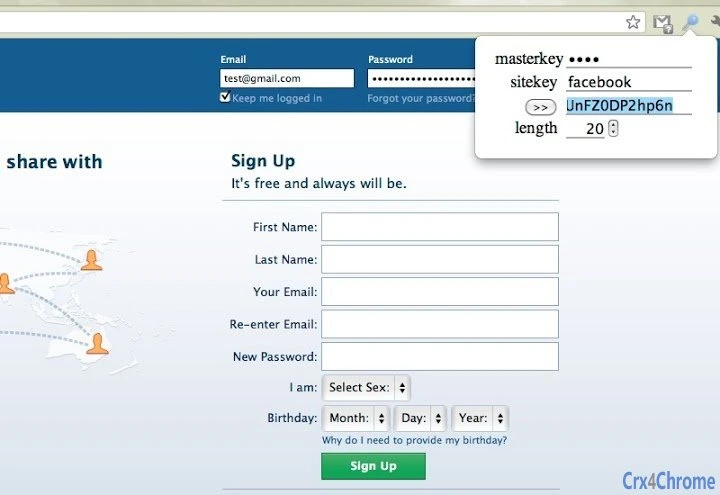
******************************Since 1Password is unhappy about the previous name of my extension, a.k.a. OnePassword, and threat to sue me in the court. I'm going to rename this to 123 Password.I hope they haven't spent a lot of money on their lawyer for this.******************************123 Password generates a different strong password for each site you visit by mixing: a) your master key, which you create by yourself, and b) a site key, which is automatically extracted from site URL.With 123 Password, you only need to remember your master key. The extension will give different passwords on different websites. The algorithm (HMAC + MD5) makes it very hard to guess your other passwords, even if one of them is compromised. The extension NEVER store any password key for you, so that security is protected even in case of hardware theft.The strong passwords generated by this extension are 20-characters long and consist of A-Z,a-z, and 0-9. You can resize the password for different sites and the extension will remember your settings.You can access the mobile website version athttp://onepwd.appspot.comFollow updates and security tips on our Facebook page:https://www.facebook.com/pages/One-Password/243101302381935Change Log:v1.7A bunch of fixes and good features! Hope you enjoy!1. Fixed the bug that for some websites auto-password-fill was not working.2. Fixed the bug that 123Password link didn't work.3. Fixed the bug that Length field change didn't auto update result field.4. Auto-password-fill now first try to fill the current input field that's in focus.5. Adding weak master password warning (for key with less than 40-bit entropy).v1.5This extension is changed to 123 Password from now on.v1.41. improved automatic sitekey suggestion.2. link to facebook page.v1.31. add control for output password length and remember your length settings.2. auto password filler. No more copy+paste.v1.21. Better sitekey parsing from the URL.2. Remembers your sitekey changes.

Guides & Tutorials for 123 Password Extension for Chrome

How to install 123 Password Extension for Chrome
  1. Click the Preview / Download button above.
  2. Once redirected, accept the terms and click Install.
  3. Wait for the 123 Password Extension for Chrome download to finish on your device.
How to use 123 Password Extension for Chrome

This software is primarily used for its core features described above. Open the app after installation to explore its capabilities.

User Reviews for 123 Password Extension for Chrome 0

    No reviews found

Similar Apps


